Introduction
The Denon DP-200 USB Vinyl Turntable is a fully automatic belt-drive record player built around convenience and simple MP3 copying. It suits listeners who want to play LPs with minimal handling and record them directly to a USB flash drive without keeping a computer beside the turntable.
Watch the product video
Its market position is firmly at the easy-use end of the vinyl category rather than the enthusiast hi-fi end. The DP-200USB is most relevant for compact systems, mini systems, receivers or powered speakers that can accept an analogue line-level signal.
This is also an older archived model, so buying one today is likely to involve checking second-hand condition carefully. Its appeal depends heavily on whether the direct USB-stick recording feature is genuinely useful to you.
Design and build
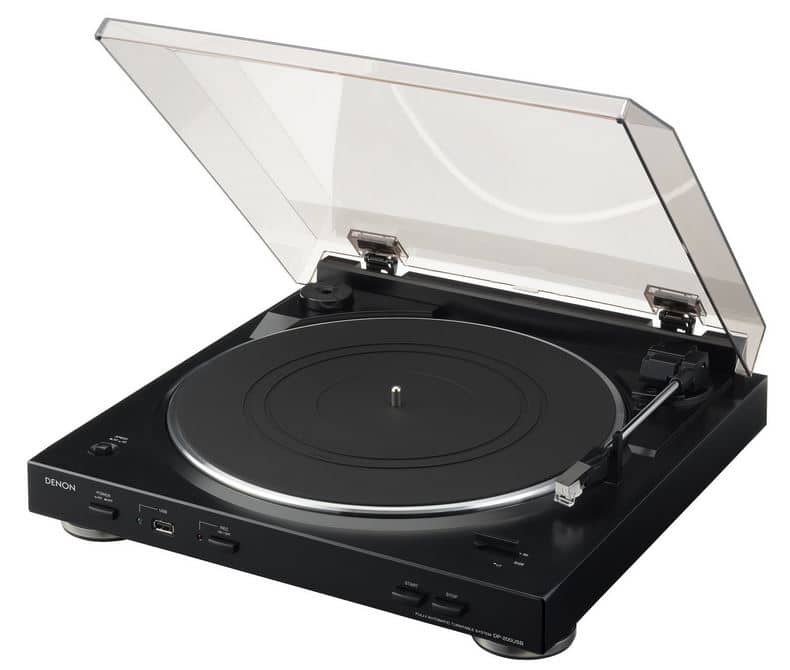
The DP-200 USB has a compact, lightweight layout with front-panel controls for power, recording, start/stop, speed and record size. That makes the main functions easy to reach, particularly if the turntable is placed in a small system or on a shelf.
Denon’s specification lists belt drive, a DC servo motor, a dynamic balanced tonearm, an aluminium die-cast platter, rubber mat and hinged dust cover. The aluminium platter is a useful construction detail at this level, although the overall design remains convenience-led rather than luxury or audiophile-focused.
The switch for the built-in phono equaliser is positioned under the platter area, so it is not something most users will change regularly. The supplied moving-magnet cartridge and DSN-84 stylus keep the package simple, but the tonearm is not designed for cartridge swapping or detailed adjustment.
Features
The headline feature is direct recording to a USB flash drive as 192 kbps MP3. This removes the need for a nearby computer during capture, which is the main practical reason to choose this Denon over many USB decks that rely on a computer connection.
Fully automatic operation is the other major convenience. After selecting the correct speed and either 30 cm or 17 cm record size, pressing START moves the arm to the record and returns it at the end of the side.
A switchable built-in phono equaliser broadens system compatibility. With the equaliser on, the turntable can feed an AUX or line input; with it off, it can be used with a conventional PHONO input.
Denon also supplied Trans Music Manager software for splitting MP3 recordings and adding track information. Its usefulness now is limited because the official compatibility is for Windows 2000, Windows XP and Windows Vista.
Setup
Initial setup is relatively simple but still requires a few mechanical steps. The platter must be fitted, the belt hooked onto the drive roller, the rubber mat placed, and the equaliser switch set correctly for either line/AUX or PHONO input use.
For playback, daily use is deliberately undemanding. Select 33⅓ or 45 rpm, choose the record size, raise the stylus cover and press START, or use the finger lift if you need manual positioning.
Recording adds one extra routine. Insert a compatible USB flash drive, press REC, start the record, then press REC again when you want recording to stop; the USB stick should not be removed during recording.
Performance
Day-to-day operation is designed to be straightforward. The automatic start and return reduce stylus handling, while manual placement remains possible using the finger lift when a specific position is needed.
The turntable supports 33⅓ and 45 rpm records, with automatic start settings for 12-inch and 7-inch discs. Official information states that 25 cm records need manual starting, and there is no listed 78 rpm support.
Connectivity is practical but specific. The USB port is for recording to compatible USB memory and cannot be used to send audio directly to a computer by USB cable; recording also continues until the REC button is pressed again, even after the arm has returned.
The stated wow and flutter figure is 0.15% WRMS, which fits the product’s casual playback role. Users wanting more speed assurance, tonearm control or upgrade flexibility should look beyond this type of automatic USB model.
Sound quality
The DP-200 USB is best viewed as a convenient record player for normal listening rather than a precision audiophile deck. Its supplied MM cartridge, built-in phono equaliser and rated 20 Hz to 20 kHz frequency range make it suitable for modest systems and casual vinyl replay.
The fixed cartridge platform, 3.5 g optimal stylus pressure and absence of user tracking-force or anti-skate adjustment place clear limits on fine tuning. Those factors matter if you are trying to optimise cartridge alignment, reduce record wear through careful setup or extract more performance from higher-grade cartridges.
For digitising, the sound quality ceiling is also shaped by the fixed MP3 recording format. A 192 kbps file may be convenient for quick listening copies, but it is not a lossless archive of an LP.
Pros
- Fully automatic start, stop and tonearm return for low-effort playback Records directly to a USB flash drive without a connected computer Switchable built-in phono equaliser suits AUX/line or PHONO inputs Supplied MM cartridge with user-replaceable Denon DSN-84 stylus
- Compact design with front-mounted controls Supports standard 33⅓ and 45 rpm records
Cons
- Records only 192 kbps MP3, with no official lossless option USB port cannot output directly to a computer by cable Recording must be stopped manually after a side finishes Limited tonearm adjustment and cartridge upgrade potential
- Bundled Trans Music Manager software is legacy Windows software
- No official 78 rpm playback support
Verdict
The Denon DP-200 USB Vinyl Turntable is a focused convenience product: automatic playback plus direct MP3 recording to a USB flash drive. For that specific job, its feature set is coherent and practical.
Its compromises are just as important. The fixed 192 kbps MP3 format, legacy software, non-adjustable tonearm setup and limited cartridge path make it less convincing for serious hi-fi use or archival digitisation.
As an older model, condition should guide any purchase. Check the automatic mechanism, belt, dust cover, hinges, USB recording behaviour and stylus history before buying, and only prioritise it over newer alternatives if its direct-to-USB workflow is the feature you really need.